

Table of Contents
- What to Look for in a 3D Printing Service
- Top 3D Printing Services for Hobbyists
- How to Prepare Files for 3D Printing Services
- Understanding 3D Printing Service Turnaround Time
- Using a Custom 3D Printing Cost Calculator
- Comparing Technologies and Materials
- Which Service Should You Choose?
- Frequently Asked Questions
Last Updated: September 3, 2026
Choosing the right 3D printing service balances affordability, material variety, and ease of use. The service you select determines whether your project succeeds or becomes an expensive mistake.
What to Look for in a 3D Printing Service
The best services offer instant quoting, support multiple technologies (FDM, SLA, SLS, MJF), and handle file preparation automatically or provide clear guidance.
Look for no minimum order requirements, clear turnaround times (separating production from shipping), and material selection that matches your needs.
Top 3D Printing Services for Hobbyists
FLM: Custom Quality and Curated Collections
FLM offers custom 3D printing and curated ready-made collections. Submit your own design or browse existing items for inspiration.
FLM's strength is attention to detail: planters include functional drainage, and figurines achieve realistic detail. This matters for hobbyists who care about end-use quality.
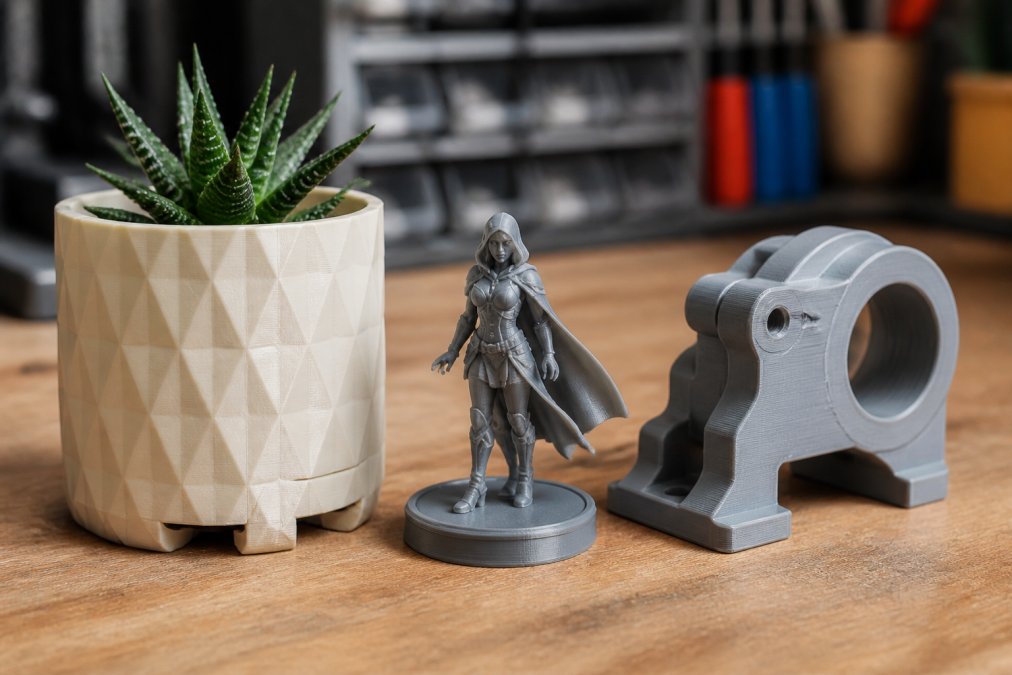
Pros:
- Custom 3D printing services tailored to your specifications
- Curated product collections for ready-to-purchase items
- Focus on functional quality (drainage, detail, durability)
Cons:
- Custom orders require design files or detailed descriptions
- Pricing depends on complexity and quantity
Craftcloud: Instant Price Comparison Across Vendors
Craftcloud aggregates multiple providers into one marketplace, letting you upload once and see quotes from dozens of vendors instantly.
The platform supports 200+ materials and multiple technologies. Quality varies by vendor, so use ratings to evaluate the tradeoff between price and reliability.
Pros:
- Highly competitive pricing due to vendor aggregation
- Extensive material and technology selection
- No minimum order quantity
Cons:
- Quality depends on which vendor you select
- Vendor selection adds a decision layer
JLC3DP: Cost-Effective Industrial-Grade Printing
JLC3DP offers professional-grade printing at hobbyist prices with instant quoting. They support SLA, MJF, SLM, FDM, and SLS.
The appeal is low entry prices with industrial-grade technology. The catch: shipping costs can exceed print cost for single-part orders. Batch multiple parts to maximize value.
Pros:
- Extremely low starting prices
- Professional industrial-grade printing technologies
- Fast turnaround times
Cons:
- Shipping costs add up for small orders
- Best value when ordering multiple parts
Treatstock: Local and Global Print Shop Network
Treatstock connects you with local and international print shops through a unified interface and includes a 3D model marketplace for design-free projects.
The local-first approach offers faster shipping and supports independent makers. The model marketplace removes the design barrier, though results depend on vendor selection.
Pros:
- Easy-to-use interface for beginners
- Access to large network of independent print providers
- Integrated model marketplace for design-free projects
Cons:
- Quality control varies by individual print shop
- Requires evaluating vendor ratings and reviews
Sculpteo: Professional Finishes and Design Analysis
Sculpteo offers instant quoting, automated file repair, and professional finishes. Design analysis tools catch failures before production, preventing waste.
Sculpteo's standout feature is finish quality and professional-grade materials. For hobbyists prioritizing aesthetics, the higher price yields fewer failed prints and better results.
Pros:
- Excellent design analysis tools prevent print errors
- High-quality industrial finishing options
- Automated file repair services
Cons:
- Generally higher price point than budget-focused marketplaces
- Premium pricing reflects professional-grade finishes
PCBWay: Electronics and Mechanical Parts Integration
PCBWay integrates PCB fabrication and 3D printing. If your project needs both circuit boards and enclosures, handle both through one vendor. They support SLA, MJF, and FDM.
The interface targets engineers with detailed material specs. PCBWay's one-stop approach saves coordination effort but feels less beginner-friendly than competitors.
Pros:
- Convenient one-stop-shop for electronics and 3D printing
- Reliable industrial-grade production standards
- Detailed material specifications available
Cons:
- Interface geared toward engineers rather than casual hobbyists
- Learning curve steeper than consumer-focused platforms
How to Prepare Files for 3D Printing Services
Most services accept STL and OBJ formats. Export from CAD software like Fusion 360 or Blender to STL. Before uploading, validate your file for defects that cause print failures.
Identifying and Fixing Non-Manifold Geometry
Non-manifold geometry is the most common defect: gaps, holes, or internal voids where the surface isn't a complete, closed shell. Printers fail or produce unusable output.
How to spot it: Use Netfabb Basic (free online tool) to analyze your STL file and highlight problem areas.
How to fix it: Use Netfabb's automated repair or manually seal gaps in Fusion 360/Blender. Most services offer automated repair during upload, though manual fixes save time and quality loss.
Checking and Adjusting Wall Thickness
Walls thinner than 0.8-1.0 mm often collapse during printing (peer-reviewed research). Use your CAD software's thickness analysis tool to measure critical points. Target 2-3 mm walls; if thinner walls are essential for aesthetics, discuss with your service provider first.
Optimizing Support Structures and Orientation
Orient your model so the largest, flattest face sits on the build platform to minimize supports. Review the service's preview before uploading; if supports cover critical surfaces, rotate and resubmit.
File Format and Export Settings
Export to STL with high mesh quality, 0.1-0.2 mm layer height, and correct scale (peer-reviewed research). Verify size before export to avoid unit conversion errors.
When to Use Built-in Repair Tools
Use automated repair if you lack CAD skills or want to save time. Tradeoff: it may over-thicken walls or fill intentional cavities. For complex internal features, repair manually or notify the service.
Understanding 3D Printing Service Turnaround Time
Turnaround time includes production and shipping, services should separate these timelines. Production speed varies by technology (FDM fastest, SLA/SLS slower). Shipping depends on location and vendor network. For 48-hour delivery, use local printing; otherwise, standard shipping saves money.
Using a Custom 3D Printing Cost Calculator
Cost depends on part volume, material, technology, and post-processing. If price is high, try reducing size, changing material, or selecting a different technology.
Comparing Technologies and Materials
Technology choice affects final look and feel. Surface finish quality is often the deciding factor for hobbyists.
FDM (Fused Filament Deposition)
FDM: Melts filament layer by layer. Visible layer lines make it unsuitable for decorative items but ideal for functional prototypes. Lowest cost ($5-$50), fastest (24-48 hours) (peer-reviewed research). Best materials: PLA, ABS, PETG. Choose FDM for functional parts or tight budgets.
SLA (Stereolithography)
SLA: UV laser cures liquid resin for smooth, glossy surfaces with excellent detail. Mid-range cost ($15-$100), slower (3-7 days). Best for figurines, jewelry, and display models. Smooth surface takes paint well.
SLS (Selective Laser Sintering)
SLS: Laser fuses nylon powder for durable, matte surfaces. Mid-to-high cost ($30-$150), moderate speed (5-10 days). Best for functional parts, complex geometry, and low-volume production.
MJF (Multi-Jet Fusion)
MJF: Inkjet applies binding agents to powder for smoother surfaces than SLS. Similar cost ($30-$150), faster (3-7 days). Increasingly the default for functional parts and low-volume production.
Surface Finish Decision Matrix
| Technology | Raw Surface Quality | Detail Resolution | Durability | Best For | Post-Processing Needs |
|---|---|---|---|---|---|
| FDM | Rough (visible layers) | Moderate | Low-moderate | Prototypes, functional parts | Sanding, painting required |
| SLA | Smooth, glossy | Excellent | Moderate (resin-dependent) | Figurines, jewelry, display | Minimal; paint-ready |
| SLS | Matte, grainy | Good | High | Functional parts, complex geometry | Optional; ready to use |
| MJF | Smooth, matte | Excellent | High | Functional parts, production | Minimal; ready to use |
Matching Technology to Your Project
For decorative items (figurines, planters, display models): SLA wins on surface quality and detail. If budget is tight, FDM works but expect to sand and paint.
For functional prototypes (brackets, enclosures, mechanical parts): MJF or SLS for durability; FDM if you're testing fit and function only.
For jewelry or miniatures: SLA is the clear choice, detail and finish are unmatched.
For low-volume production (10-100 units): SLS or MJF; no tooling costs, and per-unit cost is reasonable.
For maximum speed and minimum cost: FDM, but accept rough surface finish.
Material Selection Within Each Technology
Once you've chosen a technology, material selection depends on end-use:
- Strength and durability: Nylon (SLS/MJF) or ABS (FDM)
- Heat resistance: ABS or PETG (FDM); glass-filled nylon (SLS/MJF)
- Flexibility: TPU (FDM/SLS/MJF) or flexible resin (SLA)
- Appearance and detail: SLA resin or MJF nylon
- Cost: PLA (FDM) or standard nylon (SLS/MJF)
Which Service Should You Choose?
Choose based on priorities: FLM for custom quality, Craftcloud for price comparison, JLC3DP for cost-effective industrial printing, Treatstock for local printing, Sculpteo for finishes, PCBWay for electronics integration.
| Service | Best For | Key Strength | Standout Feature |
|---|---|---|---|
| FLM | Custom decorative and functional items | Quality and curated collections | Functional drainage in planters |
| Craftcloud | Price-conscious hobbyists | Vendor aggregation and comparison | Instant multi-vendor quotes |
| JLC3DP | Cost-effective prototyping | Industrial-grade at low prices | Automated instant quoting |
| Treatstock | Local printing and model discovery | Independent maker network | Integrated model marketplace |
| Sculpteo | Professional finishes and precision | Design analysis and finishing | Automated file repair and polish options |
| PCBWay | Electronics-heavy projects | One-stop electronics and 3D printing | Integrated PCB and 3D services |
Match your project needs to each platform's strengths. Start with FLM for custom work with attention to functional detail and end-use quality.
Frequently Asked Questions
How much does it cost to use a 3D printing service as a hobbyist?
Cost depends on part size, material, technology, and turnaround time. A simple small part might start under $10, while larger or complex projects cost more. Use a custom 3D printing cost calculator on your chosen service's website to get an instant quote based on your specific design. Pricing models are typically per-project, so you only pay for what you order with no minimum quantity requirements.
What file formats do 3D printing services accept?
Most services accept STL, OBJ, and STEP files. STL is the most common format for hobbyists. Before uploading, verify your file is manifold (no holes or gaps), has adequate wall thickness for your chosen technology, and correct dimensions. Many services offer automated file repair or analysis tools to catch errors before printing begins.
How long does it typically take to receive a 3D printed part?
3D printing service turnaround time usually ranges from 3 to 10 business days for standard orders, depending on queue volume and part complexity. Rush options are often available for an additional fee. Shipping adds 2-7 days depending on your location and chosen delivery method. Check the service's website for current lead times before placing your order.
Should I buy a 3D printer or use a printing service?
Use a service if you print occasionally, want zero maintenance, need professional finishes, or lack design skills. Buy a printer if you print frequently, need rapid iteration, want complete control, or prefer lower per-unit costs at high volumes. Services eliminate upfront equipment costs and learning curves, making them ideal for hobbyists testing ideas before committing to hardware.
What's the difference between FDM, SLA, and SLS printing for hobbyist projects?
FDM (filament extrusion) is affordable and fast but produces visible layer lines. SLA (stereolithography) uses resin for high detail and smooth surfaces, ideal for figurines and decorative items. SLS (selective laser sintering) handles complex geometries and functional parts without support structures. Choose based on your project: decorative work favors SLA, functional parts prefer SLS, and budget-conscious projects work with FDM.
This article was written using GrandRanker
0 comments